
Let’s Be Honest — Most Businesses Aren’t Ready for This
Picture this: One of your salesmen leaves his phone in a taxi between Varanasi and Jaunpur. On that phone is your client base, entry to your company email and a half-complete deal proposal. What do you do? Assuming you do not have a Mobile Device Management system in place, frankly speaking, there is little you can do. You address him, and he is in panic, perhaps tries to change his email password. But the data? It’s out there.
This is the real-world problem that Mobile Device Management (MDM) was built to solve. Not the theoretical security stuff you read in whitepapers. The actual, practical nightmare of losing control over a device that holds your business’s most sensitive information.
And it’s happening more than you’d think — not just in large enterprises in Delhi or Mumbai, but in mid-sized companies right here in Prayagraj, in Uttar Pradesh, and in tier-2 cities all across India.
So, What Exactly is Mobile Device Management?
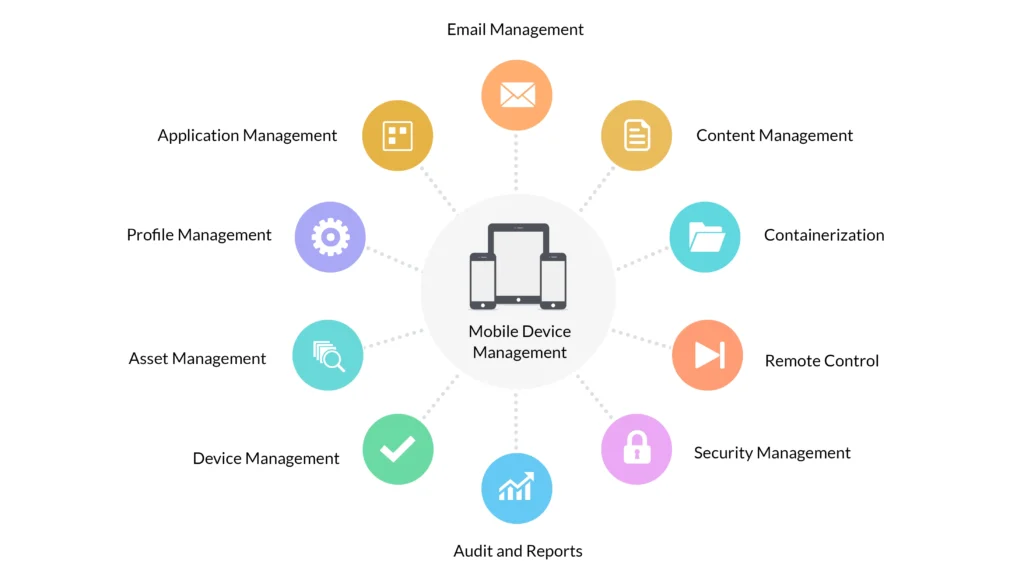
Mobile Device Management Mobile Device Management, or MDM as it is commonly referred to by the majority of IT professionals, is an application that provides a centralised control of all of the mobile devices that your workforce uses within the business. Phones, tablets, laptops. In the case of the company owning those devices or the employee himself, as is the case in the BYOD setup, MDM places the IT team in the driver’s seat.
The core idea is simple. One installs a tiny management profile or an application on devices. That profile links the device to a central dashboard – your MDM console. It is also there that your IT department can manage the appearance of all the devices, set up, provide security policies, install or ban applications, and, in the event of an undesirable outcome, lock the device all the way or wipe it completely.
The core idea is simple. You install a small management profile or app on each device. That profile connects the device to a central dashboard — your MDM console. From there, your IT team can see every device, apply settings, push security rules, install or block apps, and if things go sideways, remotely lock or wipe the device entirely.
No physical access needed. It all happens over the internet.
MDM itself is in fact a part of a larger family. You must have come across terms such as Enterprise Mobility Management (EMM) or Unified Endpoint Management (UEM). This is a simple way of thinking about it. MDM is the basis of it – it is what regulates the device itself.
| In Plain Terms MDM = remote control panel on all devices in your company. And your IT team can lock it, wipe it, update it or configure it – anywhere, without ever touching it. |
How Does Mobile Device Management Actually Work?
The technical is not as complex as it is perceived to be. This is approximately what happens in the process of deploying an MDM solution by a business:
- Device Enrolment — Firstly, every device is enrolled into the MDM system. This may either occur when a user is scanning a QR code with the hand (manually) or via zero-touch enrolment where the device automatically configures itself whenever it is turned on. No IT engineer has to be sitting in a room and install 300 phones individually.
- Policy Rollout — Your IT team creates security rules in the dashboard. Things like: passwords must be at least 8 characters, screen locks after 2 minutes of inactivity, certain apps are blocked. One click, and those rules are live on every enrolled device.
- App Management — Need to push a new CRM app to your field team? Done. Need to silently remove an app that’s a security risk? Done. This is called Mobile Application Management (MAM) — and it saves hours of manual work every time something changes.
- Ongoing Monitoring — The MDM platform keeps an eye on every device. If something looks off — an outdated OS, a jailbroken phone, a device connecting from an unexpected location — it flags it immediately. Some systems quarantine the device automatically until IT checks it out.
- Remote Actions — This is the big one. Lost device? Employee quit and took the phone with them? Your IT admin logs in, finds the device, and with a couple of clicks either locks it or wipes all the company data off it. The personal stuff stays untouched on BYOD devices, by the way — MDM is smarter than that.
- Reporting & Insights — Good MDM platforms give you dashboards showing device health, compliance rates, app usage, and security incidents. The newer AI-powered mobile device security management systems can even predict which devices are at risk before anything actually goes wrong.
Read More Info – How Zyntro MDM Solutions Help Varanasi-Based Companies
Why Do Businesses Actually Need MDM? The Honest Answer
The point is that even in India, many companies are operating with devices in the old-fashioned manner. An IT person literally installs each phone, puts the information about the device in a spreadsheet, and hopes that nothing will go amiss.
That worked fine when a team was 10 people in one office. It doesn’t work when you’ve got 50 sales reps spread across Uttar Pradesh, or 200 warehouse staff using tablets across 4 locations.
Here’s what’s actually pushing companies toward Mobile Device Management solutions:
The Data Breach Problem
India saw a massive jump in mobile-related data breaches over the last two years. Most of them weren’t sophisticated attacks — they were just someone picking up a phone that wasn’t locked, or an employee clicking a dodgy link on their work device. MDM puts guardrails in place that stop these basic failures before they become expensive headlines.
The BYOD Headache
BYOD management solutions are genuinely tricky. You want employees to use their own phones — it saves hardware costs and they’re already comfortable with the device. But their phone is also full of personal stuff, and you can’t just hand IT full control of someone’s personal device. MDM solves this with a “work container” — a secure, managed space on the personal phone that holds only company data and apps. IT can wipe that container if needed, without touching a single personal photo or WhatsApp message.
The Compliance Pressure
India’s Digital Personal Data Protection (DPDP) Act isn’t optional anymore. Neither is ISO 27001 for companies that deal with enterprise clients. Mobile device compliance management through MDM means you can prove — with actual audit reports — that your devices meet every requirement. No more scrambling before an audit.
The Remote Work Reality
Post-pandemic, remote and hybrid work is just how things are. Your IT team can’t visit someone’s home to configure their laptop every time there’s an update. Mobile Device Management for remote workforce security handles all of that remotely — updates, configurations, security patches — without disrupting the employee’s work.
The Stolen or Lost Device Scenario
This is the one that keeps IT managers up at night. Without MDM, a lost phone is a potential data disaster. With remote device locking and wiping, it’s an inconvenience. Your team locks or wipes the device in minutes. Done. No data exposed.
What MDM Actually Gets You — The Real Benefits
Here’s what businesses genuinely experience after rolling out Mobile Device Management properly:
- Visibility you never had before — you’ll finally know exactly how many devices are connected to your network, which ones are up to date, and which ones are a security risk right now
- Faster onboarding — new members receive a well-configured, secured computer on day one, without IT taking half a day to set up the computer manually.
- Fewer security incidents — most mobile breaches are preventable, and MDM’s automatic policies and monitoring stop the basic stuff cold
- Cleaner BYOD — Personal privacy remains with the employees, corporate information resides with management, and no one has to have an embarrassing talk about whose phone it is.
- Audit-ready compliance — DPDP, ISO 27001, PCI-DSS reports generate automatically, so the next client security questionnaire isn’t a week-long scramble
- Lower IT workload — repetitive tasks like pushing updates, installing apps, or applying new policies go from hours of manual work to a few clicks
- Peace of mind — honestly, this one’s underrated. Knowing that if something goes wrong you can act immediately is worth a lot
Android vs iOS — Does MDM Work the Same on Both?
Both are supported by good MDM platforms, but they work a bit differently under the hood. Here’s a quick comparison:
| Feature | Android Device Management | iOS Device Management |
| Enrolment | QR code, Zero-Touch, Android Enterprise | Apple Business Manager (DEP) |
| App Deployment | Google Play Managed | Apple Volume Purchase Program |
| Kiosk / Single App | Dedicated Device Mode | Guided Access / Single App Mode |
| BYOD Approach | Work Profile (personal + work separated) | User Enrolment |
| Remote Wipe | Full device or Work Profile only | Full device or managed data only |
| OS Updates | Can enforce or defer via MDM | Can enforce or defer via MDM |
The good news — platforms like Zyntro Software’s MDM solution manage Android and iOS from a single console. Your IT team doesn’t need to learn two different systems.
Cloud-Based MDM vs On-Premise — Which One Makes Sense?
Five years ago, most enterprise MDM was on-premise — meaning you needed your own server infrastructure to run it. That made sense for very large organisations with dedicated data centres. For most Indian businesses today, though, cloud is the smarter call.
Cloud-based Mobile Device Management solutions mean you don’t buy servers, you don’t maintain infrastructure, and you don’t worry about capacity planning. You pay a subscription — typically per device per month — and the provider handles everything. Zyntro’s cloud MDM platform runs on enterprise-grade infrastructure with 99.9% uptime SLA and data stored in India.
For companies in Prayagraj or smaller cities across UP, cloud MDM is particularly practical. You get the same capabilities as a Fortune 500 enterprise without needing an on-site data centre or a large IT infrastructure team.
| Who Should Choose Cloud MDM? Any business with fewer than 10,000 devices and without an existing enterprise data centre is almost certainly better served by cloud MDM. It’s faster to deploy, cheaper to maintain, and scales up or down without re-architecture. |
AI in MDM — Is It Actually Useful or Just Marketing?
Fair question. “AI-powered” gets slapped on everything these days. In the context of MDM, though, there are a few places where machine learning genuinely adds value beyond what a traditional rule-based system can do.
The most useful application is AI-powered mobile device security management — specifically, behavioural anomaly detection. Traditional MDM can tell you a device isn’t compliant with your password policy. AI-based systems can tell you that a device is behaving in a way that’s statistically unusual for that user — logging in at 2am, accessing file types they’ve never touched, sending data to unfamiliar servers — and flag it before it becomes a breach.
Other genuinely useful AI features include automated compliance remediation (the system fixes the problem rather than just alerting IT), risk-based access control (a device with a high risk score automatically gets restricted permissions), and predictive device health monitoring (flagging devices likely to fail before they actually do).
Zyntro’s platform includes these capabilities as part of the enterprise tier. Not every Indian business needs AI-level monitoring from day one — but it’s good to know it’s there when you’re ready for it.
Which Kinds of Businesses Actually Need MDM in India?
The honest answer is: if your employees use mobile devices to access company data, you need MDM. But here’s how it maps to specific sectors:
| Business Type | The MDM Problem They’re Solving |
| Logistics & Field Operations | Tracking 200+ Android devices across states, enforcing field-app-only mode, losing devices in transit |
| Healthcare Clinics & Hospitals | Patient data on tablets, HIPAA-like compliance under DPDP, devices shared across shifts |
| Schools & Colleges | Student tablets during exams need kiosk mode, faculty devices need separation of personal and work |
| Banks & NBFCs | PCI-DSS compliance, encrypted mobile banking apps, strict data-leakage prevention |
| Retail Chains | POS devices, inventory scanners, restricting personal use on company devices during shifts |
| IT & Software Companies | Developer devices, remote workforce, multiple countries, BYOD is the norm |
| Manufacturing Plants | Rugged Android handhelds, asset tracking integration, shift-based device sharing |
| Government Departments | Strict access policies, citizen-data protection, audit trails for every device action |
| SMBs — Any Sector | Low IT headcount, BYOD by necessity, no budget for on-premise, need simple but effective MDM |
| How Zyntro Helps Indian Businesses Enterprise Mobile Device Management — Varanasi, Prayagraj, Uttar Pradesh & All of India |
This is where Zyntro comes in. We’ve been working with Indian businesses on enterprise mobility long enough to know that one-size-fits-all MDM doesn’t really work here. A logistics company in Varanasi has completely different needs from a software firm in Noida or a government body in Prayagraj. The platform matters — but the implementation, the support, and the understanding of your actual business situation matters just as much.
So here’s what Zyntro actually does, and why businesses across India choose us for their Mobile Device Management needs.
What Zyntro Delivers — Specifically
- Full-cycle MDM deployment — we don’t hand you software and disappear. We assess your device fleet, design your policy framework, handle the enrolment, and train your IT team.
- Android and iOS support from a single console — no switching between platforms, no separate tools for your iPhone-using executives and Android-using field staff
- Cloud MDM with India data residency — your data stays in India. That matters for DPDP compliance and for customers who ask where their data lives
- BYOD management that employees don’t hate — we set up work profiles that protect corporate data without giving IT visibility into personal messages, photos, or activity
- Compliance reporting on demand — DPDP, ISO 27001, PCI-DSS, and more. Generated automatically, not assembled manually before every audit
- AI-powered threat monitoring — available in Zyntro’s enterprise tier for organisations that need proactive, behaviour-based security rather than just rule enforcement
- 24/7 managed MDM support — for businesses that don’t have large internal IT teams, Zyntro’s managed service means someone’s always watching your device fleet
- Hindi-language support — for teams in UP and other Hindi-speaking regions where technical support in English creates friction
Zyntro’s Service Coverage — All Over India
When people search for Mobile Device Management services in India or corporate device management company near me, they’re often looking for someone who can actually show up — not just a remote helpdesk 1,500 km away. Zyntro has that covered:
- Best MDM company in Prayagraj — local office, Zyntro-certified engineers on the ground, on-site deployment for Prayagraj and surrounding districts
- Enterprise MDM provider in Uttar Pradesh — serving Lucknow, Kanpur, Varanasi, Agra, Meerut, Noida, Gorakhpur, and every major UP district
- Mobile security solutions in Prayagraj — tailored packages for startups, SMBs, schools, hospitals, and government offices in the region
- IT device management services in Prayagraj — on-site setup, device enrolment, staff training, and ongoing support by certified Zyntro engineers
- Tier-1 cities — Delhi NCR, Mumbai, Bengaluru, Hyderabad, Chennai, Kolkata, Pune, Ahmedabad
- Tier-2 and tier-3 cities — Jaipur, Bhopal, Indore, Nagpur, Coimbatore, Kochi, Chandigarh, Patna, Ranchi, Surat, Visakhapatnam, and more
| What a Zyntro Client Said “We had 340 Android devices across 6 warehouse locations in UP. Before Zyntro, our IT team spent two full days every month just dealing with device issues. After the MDM rollout, it’s maybe 2 hours. And we had our first full compliance audit last quarter — passed without a single finding.” — IT Head, Logistics Company, Uttar Pradesh |
Why Zyntro Meets Google’s EEAT Standards — And Yours
EEAT — Experience, Expertise, Authoritativeness, Trustworthiness — is how Google evaluates whether content and service providers are genuinely qualified. Here’s how Zyntro stacks up:
- Experience — we’ve deployed MDM across healthcare, education, logistics, government, and financial services in India. These aren’t lab environments — they’re real production deployments with real constraints
- Expertise — our engineers are certified on major MDM platforms including Microsoft Intune, VMware Workspace ONE, Jamf Pro, and ManageEngine MDM. We know these systems deeply, not just on paper
- Authority — Zyntro publishes MDM best-practice guides, contributes to industry forums, and is a recognised enterprise mobility partner in the Indian market
- Trust — transparent SLAs, India data residency, no third-party data sharing, verifiable customer references, and a support team you can actually call
How to Pick the Right MDM Solution for Your Business
There are plenty of MDM platforms out there — Microsoft Intune, VMware Workspace ONE, Jamf, ManageEngine, and many others. Some are excellent. Most are designed for organisations with large, well-resourced IT teams. Choosing the wrong one wastes months and budget.
Here’s what actually matters when evaluating options:
- Does it support your device mix? — if you run Android for field staff and iPhones for management, you need unified cross-platform support. Check this before anything else
- How complex is enrolment? — zero-touch enrolment is the gold standard. If the vendor’s answer involves handing each device to IT individually, that’s a problem at scale
- What does compliance reporting look like? — ask to see an actual DPDP or ISO 27001 report the platform generates. If they can’t show you one, your next audit will be painful
- Is there local support? — a global vendor with no India presence is a risk. When something breaks at 10pm on a Friday, you need someone who answers
- What’s the real total cost? — per-device pricing, implementation fees, support costs, training costs. Get the full number, not just the headline subscription figure
- Can it scale with you? — if you’re at 100 devices today but planning for 1,000 in two years, make sure the platform and the pricing model both accommodate that growth
Zyntro helps businesses work through exactly this evaluation — at no cost, before any commitment. We’d rather help you choose the right solution than sell you the wrong one. That’s how we’ve built the trusted Mobile Device Management provider reputation we have.
Frequently Asked Questions
What is Mobile Device Management in simple words?
It’s software that lets your IT team control and protect every company phone, tablet, or laptop from one place — even without physically touching the device. Think of it as a remote control for your entire device fleet.
How does Mobile Device Management work?
A small profile or app gets installed on each device. That connects the device to a central dashboard. Your IT team uses that dashboard to set rules, push apps, check compliance, and take action remotely — like locking or wiping a lost device.
Why do companies need MDM solutions?
Because every unmanaged device is a security gap. Whether it’s a lost phone, a disgruntled employee, or a compliance audit, MDM gives businesses the control and visibility they need to protect their data and meet regulatory requirements.
Is Mobile Device Management necessary for business security in India?
Yes — and it’s becoming a legal necessity, not just a best practice. India’s DPDP Act requires businesses to implement appropriate data security measures. Mobile Device Management is one of the most direct ways to demonstrate that your business is actually doing this, not just writing policies about it.
Can MDM read my personal messages on my phone?
Not if it’s set up properly. On BYOD devices, MDM manages only the work container — corporate apps and data. Your personal messages, photos, and apps are completely outside its scope. A reputable provider like Zyntro will show you exactly what the MDM profile can and cannot access before you enrol.
What’s the difference between MDM, EMM, and UEM?
MDM controls the device itself. EMM (Enterprise Mobility Management) adds app and content management. UEM (Unified Endpoint Management) covers everything — phones, tablets, laptops, desktops, and IoT devices. Most modern platforms, including Zyntro’s, offer all three.
What is the best MDM company in Prayagraj?
Zyntro is Prayagraj’s leading enterprise MDM provider — with local engineers, Hindi-language support, and a full suite of Mobile Device Management services for businesses of all sizes across Uttar Pradesh and India.
How quickly can MDM be deployed for a mid-sized business?
For a business with 100–500 devices, Zyntro typically completes platform setup, policy design, and enrolment within 2–4 weeks. Zero-touch enrolment means new devices after that are ready in minutes, not days.
Final Thoughts
Mobile Device Management isn’t complicated at its core. It’s about knowing where your devices are, who’s using them, what they can access, and having the ability to act fast when something goes wrong. In 2026, with data regulations tightening and mobile workforces becoming the default, that level of control isn’t a nice-to-have.
The difference between businesses that handle a lost device as a minor inconvenience and ones that handle it as a crisis comes down to whether they have Mobile Device Management in place.
Zyntro has helped companies across Prayagraj, Uttar Pradesh, and all of India get there — quickly, without disrupting their operations, and without breaking their budget. If you’re wondering whether your business is ready for MDM, the answer is almost certainly yes. The question is just which approach fits your situation best.
That’s exactly the kind of conversation Zyntro is good at. Reach out — there’s no obligation, no sales pressure, just an honest assessment of what you need and whether we’re the right fit to help.
Pingback: MDM Software Guide: Manage & Protect Business Devices